
If you use the FlashTalking Ad Builder platform, this snippet might be useful to you.
This snippet allows you to have an instant ad variable which can be completed by your PPC monsters. This will allow any video to be used in a banner creative as opposed to using FlashTalking’s built in video encode and storage (which has a limit of 9 videos as far as I can tell).
The downside is you will have to host the videos yourself. So, you’ll probably want a pretty robust CDN if the video is going to be smashed out with a lot of impressions. Personally, I’ve tested this using the pure video streams that I can get out of the place where I work’s Vimeo Pro account and using that as a CDN (If anyone knows how to stream a lot of video it should be Vimeo).
To use this, jump into Ad Builder, and add a text component and video component to your artboard. Set up your text component as a dynamic ad as below.
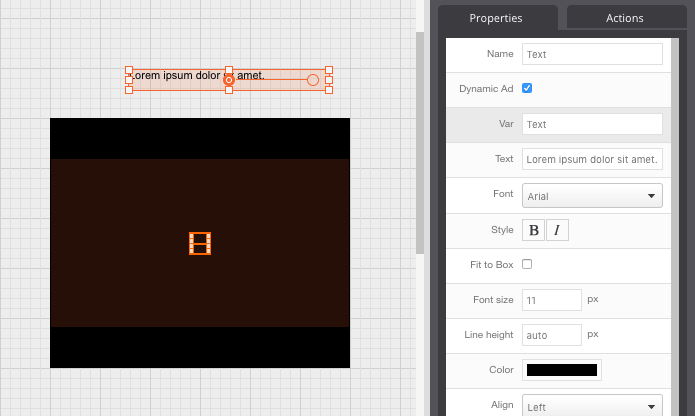
Then to swap out your videos, use this custom code in the custom code editor:
   player.page('Main Page').at(0, function(timeline, page) {
        // Get the instant ad variable
        var text = page.layer('Text').getProperty('text');

        // Bit of logging for testing output
        console.log("instant ad variable is "+text);

        var urlMp4 = "";
        var urlWebM = "";

        // Check if the instant ad string is empty
        if (text !== ""){
           //Replace the string if it's mp4 for a webM string for compatibility
           if ( text.toLowerCase().indexOf("mp4") >= 0){
                urlMp4 = text;
                var urlReplacingMp4FileExtension = text.replace("mp4", "webm");
                urlWebM = urlReplacingMp4FileExtension;
           }
        }

        // Get our video element
        var vid = page.layer('Video').getElement();
            // Change the source attribute
   	    var actualSource = vid.getElementsByTagName('source');
   	    if (urlMp4 !== "" && urlWebM !== ""){
               actualSource[0].setAttribute('src', urlMp4);
               actualSource[1].setAttribute('src', urlWebM);
        }

        // Bit of logging for testing output
        //console.log(actualSource[0].getAttribute('src'));
        //console.log(actualSource[1].getAttribute('src'));
    });